
A TikTok Live run of show template is the minute-by-minute production plan for a live shopping broadcast: time blocks, featured SKU, offer, demonstration, talking points, pinned-product action, comment prompts, and an owner for each segment. We build one for every stream we run from our Beverly Hills studio, because a structured show converts better than a host winging it in front of a camera.
Below is a full template you can copy, section by section, plus the tools and scripts to run it.
Key takeaways
-
A run of show is a production document, not just a host script. Each segment needs a time block, a SKU, an offer, a demo, comment prompts, and an owner.
-
Plan for 60 to 90 minutes with 12 to 15 minute product blocks, built around three to five products, not your whole catalog.
-
Open with a hero product and a visible result in the first 30 seconds. Save bestsellers and limited stock for the final segment to drive urgency.
-
Sellers who hosted TikTok LIVE during the 2025 holiday weekend saw 84% year-over-year sales growth, per TikTok. Structure is why some shows capture that and others don't.
-
Highly niche, B2B, ultra-premium, or brand-new accounts need education first, not a pure conversion show.
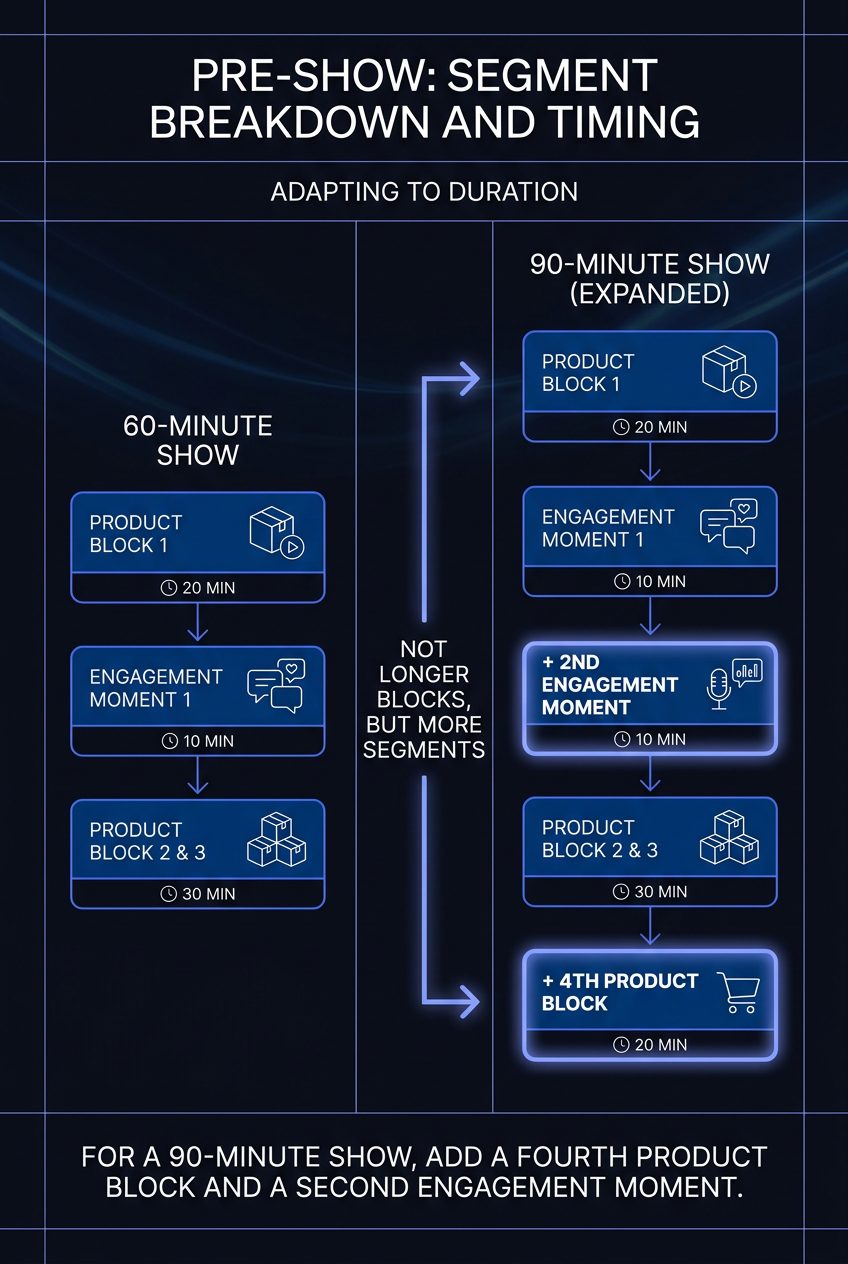
Table of contents
What a TikTok Shop Live Run of Show Is
A TikTok Shop Live run of show is the complete timeline and script for a live shopping broadcast: every time block mapped to a featured product, an offer, a demonstration, the host's talking points, the moment the item gets pinned, and the comment prompts that keep viewers watching. It is the difference between a show and a stream.
Unstructured streams drift. The host runs out of things to say, the offer never gets restated, and viewers leave before the purchase instruction ever lands. A run of show fixes that by assigning a job to every minute.
The momentum is real. TikTok reported that U.S. LIVE Shopping sales more than doubled year over year in the first half of 2026, and that sellers running livestreams over the 2025 holiday weekend saw 84% year-over-year sales growth. Treat those as platform-reported and directional, not independently audited.
According to Platinum Commerce's 2026 studio operations, we stream daily from 12 live rooms in Beverly Hills, and every live room runs off a written run of show. The typical format is 30 to 90 minutes.
Pre-Show: Segment Breakdown and Timing
Build your run of show as a clock with named segments. Here is a 60-minute template we use as a starting point for electronics, home, gaming, and lifestyle shows. The minute allocations are an editorial template, not a platform-mandated standard.
| Time | Segment | Job |
|---|---|---|
| 00:00–03:00 | Opening hook | Value, what's happening, reason to stay |
| 03:00–15:00 | Hero SKU demo | Setup, use, result, objection handling |
| 15:00–18:00 | Engagement moment | Questions, social proof, purchase instructions |
| 18:00–30:00 | Second product | Complementary accessory or bundle value |
| 30:00–35:00 | Flash deal | Limited-time coupon, bundle, or giveaway |
| 35:00–47:00 | Third product | Compare models, sizes, features, use cases |
| 47:00–55:00 | Return to hero | Answer open questions, restate offer |
| 55:00–60:00 | Closing CTA | Offer deadline, shipping/returns, next LIVE |
The opening hook runs 1 to 2 minutes. Product showcase segments run 12 to 15 minutes each, which matches the 15 to 20 minute product blocks current playbooks recommend. Keep the transitions scripted: name the next product before you drop the current one so nobody tunes out in the gap.
For a 90-minute show, add a fourth product block and a second engagement moment, not longer blocks.
Product Selection and Sequencing Rules
Order products for momentum, not by catalog number. The sequence does as much work as the script.
-
Open with a hero product. Your most recognizable, most-reviewed item proves legitimacy in the first block. One in five new viewers is deciding whether this show is real. A known hero SKU answers that fast.
-
Stagger your price points. Don't stack three high-ticket items back to back. Alternate so there's always an accessible entry offer on screen within a few minutes.
-
Hold bestsellers and limited stock for the final segment. Scarcity lands hardest when the viewer has already watched for 40 minutes. A "we have 30 units left" callout in the closing block drives the urgency that an open-ended offer never will.
A current third-party live selling playbook recommends featuring three to five products per session rather than your full catalog. We agree. Fewer products means more demonstration time per SKU, and demonstration is what converts on TikTok Shop. This is also why your TikTok Shop strategy can't be your Amazon strategy: the format rewards showing, not listing.
Scripts, Host Talking Points, and Creator Briefs
Script the structure, not the words. A host reading a word-for-word script sounds robotic and viewers feel it. Give talent a one-page brief per product with the beats they must hit, then let them talk like a person.
Each product block brief should carry:
-
Product name/SKU: the exact TikTok Shop listing name, so pinning matches what's on screen.
-
Primary promise: one measurable or observable benefit. "50-hour battery" beats "great battery."
-
Proof: the live demo, comparison, test, unboxing, or customer use case.
-
Objections: price, compatibility, dimensions, battery life, warranty, shipping, returns, setup difficulty, required accessories.
-
Offer: standard price, LIVE-only price or bundle, coupon eligibility, and the exact offer end time.
-
Pinned-product action: the minute the host or producer pins the item.
-
Comment prompts: the question the host asks viewers to type.
Example talking points we use by category:
-
Electronics: open with the visible result. Run a speed test, a sound comparison, or a before/after setup. Then handle the top objection, usually compatibility or warranty.
-
Home: lead with the problem solved and the finished result. Show the messy "before," then the clean "after," then the price.
We produce more than 7,000 creator videos a month, per Platinum Commerce's 2026 content production records, and the briefs behind our live selling shows use this same one-page format.
Visual Setup and Technical Checklist
A live shopping broadcast is a TV production. The set and the signal have to hold for the full 60 to 90 minutes. Here is the on-set requirement list and the pre-show checklist to run 30 minutes before going live.
On-set requirements:
-
Lighting: a key light on the host and a fill light to kill shadows on the product.
-
Camera: one locked wide shot plus a close-up angle for demos.
-
Product staging: every featured SKU within arm's reach, in sequence order, pre-opened if you plan to demo it.
-
Background: clean branded backdrop or green screen, nothing that competes with the product.
-
Audio: a dedicated lav or shotgun mic, never the phone's built-in mic.
-
Internet redundancy: a wired connection plus a cellular hotspot on standby.
Pre-show checklist, 30 minutes out:
-
Confirm the hero product and LIVE offer are already in the product carousel so the host can pin immediately.
-
Test the pin on a hidden item.
-
Check audio levels and lighting on camera, not by eye.
-
Confirm coupon and flash-deal mechanics are live in Seller Center. Check eligibility against TikTok's current Seller University guidance.
-
Run the redundant connection for two minutes before going live.
Viewer Engagement and Comment Management
Engagement is a role, not an accident. Assign one person to moderate comments while the host presents, because a host reading and selling at the same time does neither well.
The workflow we run:
-
Moderator surfaces questions. They pull buyer questions out of the comment stream and feed them to the host on a cue card or earpiece, so real questions get answered on air.
-
Call and response. Every 5 to 10 minutes, the host repeats the purchase instruction and asks viewers to type something: a product they want to see, a yes/no, their city. This is a current third-party recommendation, not a TikTok rule, but it keeps the comment velocity up.
-
On-screen questions. Surface the best buyer question on screen and answer it directly. Other viewers with the same question stay.
Use polls, gift incentives, and flash deals to rescue slower moments. If comment velocity drops in a mid-show lull, that is the cue to trigger a poll or announce the next deal, not to keep talking.
Gifts, Flash Deals, and Scarcity Mechanics
Scarcity works when it's real and time-locked. Build limited-quantity drops and time-locked discounts into specific segments of your run of show instead of floating a vague "sale today" across the whole stream.
Put the mechanics on the clock:
-
Time-locked discount: "This price holds until 8:45, then it's gone." A deadline the viewer can see beats an open-ended offer, because open-ended offers give no reason to buy now.
-
Limited-quantity drop: announce real unit counts and update them live. "Down to 20."
-
Gift-triggered offer: tie a bonus or coupon unlock to a gift or comment milestone to lift participation in slow stretches.
Live selling is where this pays off. TikTok reported more than 760,000 LIVE sessions and 1.6 billion views over the 2025 holiday weekend, with 84% year-over-year sales growth for livestreaming sellers. We ranked #1 in TikTok Shop's Multi-Category Seller Live Sprint, per Platinum Commerce's 2026 ranking, and time-locked offers anchored to the run of show are a big part of how we run shows. We never promise a specific conversion lift. The source data does not establish a universal number, so treat time-limited as a tested-better practice, not a guaranteed multiplier.
Where This Template Breaks Down
This conversion-focused template is the wrong tool for some products and accounts. Be honest about which bucket you're in before you build the show.
-
Highly niche or B2B products. A short demo and a flash deal won't close a considered B2B purchase. These need extended educational segments and often a sales conversation off-platform.
-
Ultra-premium luxury items. Pure urgency mechanics cheapen a luxury brand. Lead with story and craftsmanship, not a countdown timer.
-
Brands with no prior TikTok presence. If you have no followers and no content history, a conversion show plays to an empty room. Build brand and content first, run a proper cold start, then layer in the full run of show.
Platinum Commerce does not work with pre-product brands. If you don't have a product shipping yet, this template, and our model, isn't the fit. Come back when you have inventory to sell.
Tools and Templates to Organize Your Show
Organize your run of show with a small, boring toolkit. The job is coordination, not software. Group your tools by phase.
Pre-production planning
-
Run of show spreadsheet: one row per segment, columns for time, SKU, offer, demo, talking points, pin action, comment prompt, and owner. Google Sheets or Excel is enough.
-
Product sequencing sheet: list your three to five products with price points and stock counts so you can order them for momentum.
-
Creator brief template: the one-page per-product brief from the scripts section, one tab per host.
Day-of execution
-
Rundown sheet: the printed or on-screen version of the spreadsheet, visible to the host and producer.
-
TikTok Shop Seller Center: set up the product carousel, pins, coupons, and flash deals before you go live. Follow TikTok's Seller University for current feature rules.
-
Moderator doc: a shared sheet where the moderator logs recurring questions to answer on air.
Post-show analysis
-
Performance recap: pull GMV, watch time, and conversion per product block from your TikTok Shop dashboard so you know which SKU and which segment carried the show.
-
Run of show v2: mark what to cut, keep, or re-time for next broadcast.
If building and staffing all of this in-house is more than your team wants to own, that's our model. Platinum Commerce carries more than 100 brands across electronics, home, gaming, and lifestyle, per our 2026 brand roster, and runs the whole production from script to pin to fulfillment. See how our managed services work or book a call to talk through your shop.
Frequently asked questions
How long should a TikTok Shop live run of show be?
Plan for 30 to 90 minutes, with 60 to 90 as the usual tested range. One current playbook names 60 minutes as a practical minimum. Inside that, run 12 to 15 minute product blocks around three to five products. Longer formats are a test variable, not a platform-set ideal.
How many products should I feature in one TikTok live?
Three to five, per current live selling playbooks. Fewer products means more demonstration time per SKU, and demonstration is what converts on TikTok Shop. Open with a hero product and hold limited-stock bestsellers for the final segment.
What goes in a run of show document?
One row per time block, with the featured SKU, the offer, the demonstration, host talking points, the exact moment to pin the product, a comment prompt, and an owner for the segment. It's a production document, not just a host script.
Do flash deals actually convert better than standing discounts?
Time-locked offers give the viewer a reason to buy now, which open-ended discounts don't. The public data doesn't establish a universal conversion multiplier, so treat time-limited deals as a tested-better practice rather than a guaranteed lift. Announce a real deadline and real unit counts.
Who should not use a conversion-focused live template?
B2B and highly niche products, ultra-premium luxury items, and brands with no TikTok presence yet. Those need education or brand-building first. A pure conversion show plays to an empty room if you have no audience and no content history.