Your first TikTok Shop live stream comes down to seven steps: set up your seller account, list and sync products, prep creative and teasers, build your studio, book creators, run a timed show, then read your analytics and schedule the next one. That is the whole arc, from a cold account to a stream that sells. Below is the checklist we use at Platinum Commerce, grouped by the job each tool and task does, with notes on when to reach for each.
We run daily TikTok LIVE shopping from our Beverly Hills studio, so this is how we actually do it, not theory.
Key takeaways
- A first TikTok Shop live stream needs an approved shop listing before any product can go in the LIVE shopping bag, per TikTok's 2026 seller guidance.
- Two tools do the work: Seller Center for shop and listing admin, the TikTok app for the LIVE itself.
- TikTok recommends pinning one product at a time and refreshing it roughly every 30 seconds.
- Platinum Commerce streams from 12 live rooms and ranked #1 in TikTok Shop's Multi-Category Seller Live Sprint.
- The TikTok Shop Accelerator Program is the fast path; DIY works if you have time, a studio, and creators lined up.
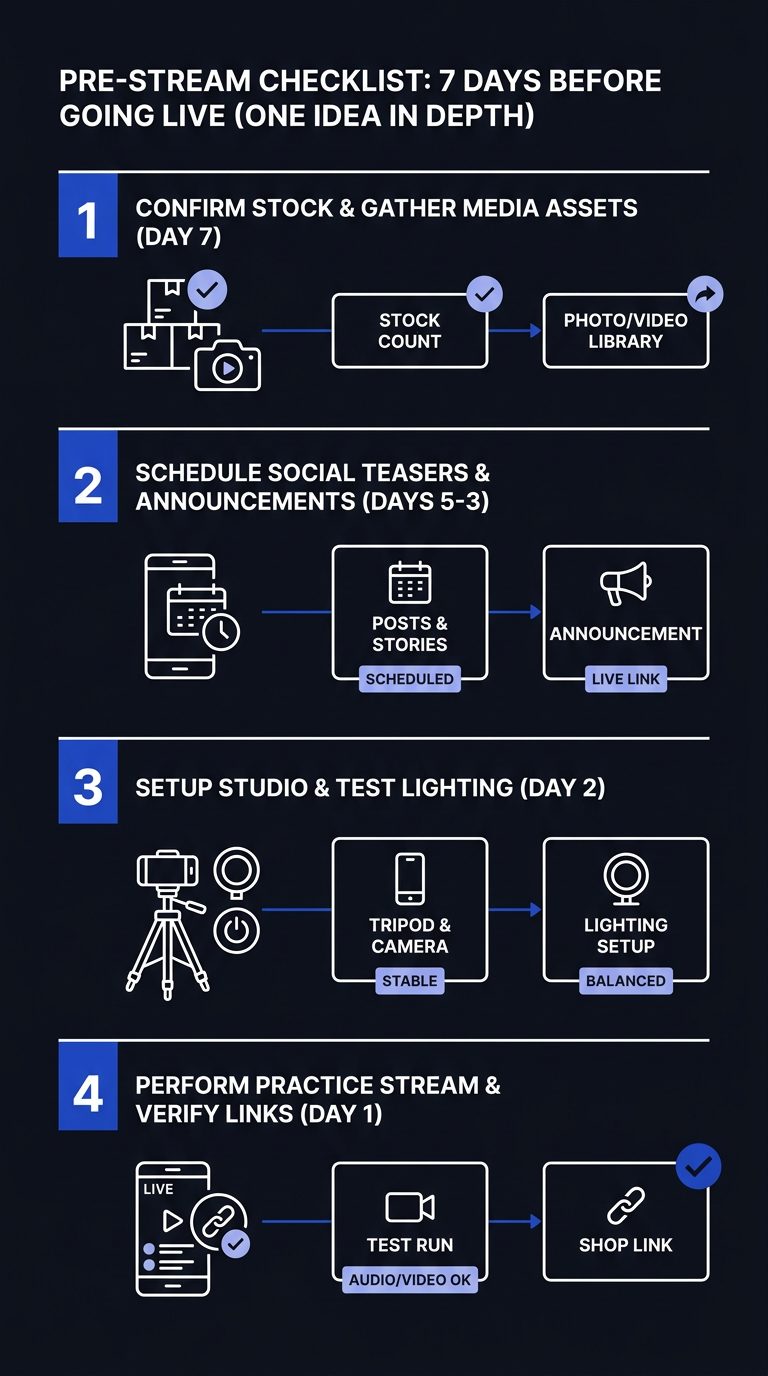
Table of contents
- 7 Steps to Your First TikTok Shop Live Stream
- Which TikTok Seller App Do You Need?
- Does TikTok Shop Live Work for Your Business?
- Pre-Stream Checklist: 7 Days Before Going Live
- Creator Lineup: Building Your First Live Team
- Studio Setup: Equipment, Lighting, and Audio Essentials
- TikTok Shop Accelerator Program: Fast-Track to First Stream
- Live Stream Runsheet: What Happens Minute by Minute
- Conversion Hooks: Products, Pricing, and Scarcity Tactics
- Post-Stream Analytics: What Metrics Tell You About Success
- Scaling From One Stream to Weekly or Daily
- Common First-Stream Mistakes to Avoid
- Getting Help: When to Use an Agency vs. DIY
7 Steps to Your First TikTok Shop Live Stream
A first TikTok Shop live stream runs through seven phases, and each one has a gate you cannot skip. Here is the full sequence.
- Set up and verify your seller account in Seller Center with business details, tax info, and product compliance.
- List and approve products. A standard LIVE sale requires an approved regular shop listing before the item can enter the LIVE shopping bag, per TikTok's 2026 guidance.
- Build your creative and teasers. TikTok recommends publishing at least one teaser video one day before the LIVE and promoting again roughly two hours before.
- Set up the room, script, and moderation. Add products to the LIVE Showcase and prepare your pinning sequence.
- Book and brief your creators or hosts.
- Go live from the TikTok app by tapping + then LIVE, pinning one product at a time.
- Read the analytics and schedule the next stream.
Treat these as gates, not a wish list. Skip listing approval and there is nothing to sell on screen.
Which TikTok Seller App Do You Need?
You need two things, and people confuse them constantly: Seller Center for administration and the TikTok app for the actual LIVE. There is no single "TikTok seller app" that does both.
- Seller Center (seller-us.tiktok.com) is the back office. Product listings, shop operations, LIVE setup, seller education, and order management live here. TikTok's 2026 LIVE selling page groups onboarding materials, educational videos, and step-by-step checklists in one place.
- The TikTok consumer app is where the broadcast happens. You connect your account to your shop, add products, and start a LIVE with + then LIVE.
- Desktop LIVE management arrived in January 2025, adding LIVE Manager, Practice Mode, OBS camera support, and scheduled LIVE Events. For electronics and home demos, this gives you a more controlled multi-camera setup.
Creator app integration layers on top: affiliates record and post from their own TikTok accounts, then their videos and LIVEs link back to your shop listings. For how that connects to a managed shop, see our TikTok Shop managed services.
Does TikTok Shop Live Work for Your Business?
TikTok Shop live works best for consumer products you can show and explain on camera: electronics, home, gaming, and lifestyle. It works less well where demonstration adds nothing or where you cannot sustain the volume. Be honest about which camp you are in.
It fits you if:
- Your product benefits from a demo, comparison, or bundle you can show live.
- You have inventory and fulfillment that can absorb a spike.
- You can commit to recurring streams, not one broadcast. TikTok's 2026 guidance frames LIVE shopping as a recurring content channel, not a one-off event.
It struggles if:
- You are pre-product. Platinum Commerce does not work with pre-product brands, and neither should most accelerators.
- Your margins cannot carry commission plus content costs.
- Your category needs regulated claims you cannot make on a live feed.
The algorithm rewards volume. One stream rarely tells you much. If you cannot sustain a cadence, fix that before you build a studio.
Pre-Stream Checklist: 7 Days Before Going Live
Seven days out, your job is to clear every approval gate and remove every technical surprise. Work this list in order, because listing approval is the long pole.
| Task | Tool / source | When it matters |
|---|---|---|
| Verify seller account, tax, compliance | Seller Center | Blocks everything downstream |
| Create and approve product listings (photos, title, category, brand, attributes, SKU, price, inventory, dimensions) | Seller Center | Required before a product enters the LIVE bag |
| Sync inventory and test fulfillment | Seller Center + 3PL | Prevents overselling on a spike |
| Add products to LIVE Showcase, set pin order | TikTok app | Controls the show flow |
| Write the script and moderation rules | TikTok LIVE setup | Keeps the room on message |
| Record teaser videos | UGC / content | One a day before, one ~2 hours before |
| Lighting and audio check | Studio | Avoids the most common fail |
| Confirm creators / hosts | Creator network | Locks your lineup |
Two cautions from running this at scale. First, do not lean on temporary listings for core products until your listing approval, inventory, fulfillment, and customer-service workflows are tested. Second, auctions are only allowed for categories TikTok expressly permits, like collectibles and eligible Surprise Sets, so they are not a default tactic for electronics, home, gaming, or lifestyle goods.
Creator Lineup: Building Your First Live Team
Your first live team is a host who can carry the room plus affiliates who seed demand before and after. Vet for fit before chemistry, because a mismatched category kills conversion faster than a dull host.
We match creators through an in-house affiliate sample center. The model is simple: sample the product, let creators post, track which ones actually move units, then bring the strongest onto the live team.
What to evaluate before you go live together:
- Category match. Has the creator sold or demoed products like yours?
- Conversion history, not follower count. A 50K-follower creator who sells beats a 2M one who entertains.
- On-camera product handling. Can they demo without a script babysitter?
- Reliability. Will they show up, sample on time, and hit the run order?
For how affiliate sourcing and management runs end to end, see our affiliate and creator management.
Studio Setup: Equipment, Lighting, and Audio Essentials
A professional TikTok LIVE commerce setup needs clean light, clear audio, a stable feed, and a product table in frame. Everything else is optional. According to Platinum Commerce's 2026 studio records, we stream from 12 live rooms in our Beverly Hills studio at 466 N Beverly Drive, which is the standard we build to.
Essential:
- Two soft key lights plus a fill, so product detail reads on camera.
- A dedicated microphone (lav or shotgun), never phone audio, for a talking-heavy format.
- A hardwired internet connection as primary, mobile hotspot as backup.
- A tripod or mount at product-eye height.
- A clean product staging surface inside the frame.
Nice to have:
- A second camera and OBS for multi-angle demos, supported since the January 2025 desktop LIVE update.
- A confidence monitor showing the live chat.
- Branded backdrop and signage.
You do not need 12 live rooms to start. You need one live room that nails light, sound, and connection. Scale the room after the format works.
TikTok Shop Accelerator Program: Fast-Track to First Stream
The TikTok Shop Accelerator Program is a structured pathway that compresses account setup, listings, content, creators, and live selling into one managed timeline instead of a DIY scramble. It is the right call when you want speed and do not want to build a studio and creator network from scratch.
According to Platinum Commerce's 2026 onboarding timelines, brands typically go from onboarding to live selling in about 10 weeks through our full-stack program, and Platinum Commerce ranked #1 in TikTok Shop's Multi-Category Seller Live Sprint.
| DIY setup | TikTok Shop Accelerator | |
|---|---|---|
| Time to first stream | Varies widely | ~10 weeks typical |
| Studio | You build it | 12 live rooms ready |
| Creators | You source each one | Category-matched creator network |
| Content | You produce it | 7,000+ videos a month |
| Risk model | All yours | Buy & Sell (no fees) or Managed Services |
See the full sequence on our how Buy & Sell works page.
Live Stream Runsheet: What Happens Minute by Minute
A live stream runsheet keeps a first stream from drifting. The structure is opening, product rotations, engagement prompts, then a strong close. Use TikTok's own pacing: pin one product at a time and refresh the pinned product roughly every 30 seconds, per its 2026 guidance.
| Segment | Timing | What happens |
|---|---|---|
| Open | 0:00 to 3:00 | Greet, state the offer, set the hook for staying |
| Product block 1 | 3:00 to 15:00 | Pin product, demo, refresh pin ~every 30s |
| Engagement | 15:00 to 18:00 | Answer chat, poll, tease the next deal |
| Product block 2 | 18:00 to 35:00 | Comparison and bundle, rotate pins |
| Peak offer | 35:00 to 45:00 | Limited-time price, inventory call-outs |
| Close | 45:00 to 50:00 | Recap, final CTA, tease next stream |
Sequence products by use case, setup, demonstration, comparison, bundle, then final offer, rather than dumping the full catalog on screen. Change the product shown using the shopping bag interface as you move through blocks.
Conversion Hooks: Products, Pricing, and Scarcity Tactics
Conversion on TikTok LIVE comes from three levers: the right product mix, time-boxed pricing, and honest scarcity. Pull them in sequence, not all at once.
- Lead product. Open with your proven seller, not the item you want to clear.
- Bundle strategy. Pair a hero product with an accessory at a combined price that beats buying separately.
- Limited-time pricing. Hold the best price for a defined window inside the stream, then say when it ends.
- Real-time inventory calls. Call remaining units as they drop. Scarcity only works when it is true.
- One pin at a time. Keep attention on a single offer and refresh it ~every 30 seconds, per TikTok's 2026 guidance.
Skip auctions unless TikTok has expressly approved your category and format, and where they are allowed, all bidding must run through TikTok Shop's Countdown Bidding Feature. For most electronics, home, and gaming products, bundles and limited-time pricing do the work.
Post-Stream Analytics: What Metrics Tell You About Success
Post-stream analytics tell you whether the format worked and what to change next time. Read them in this order of importance for a first stream.
| Metric | What it tells you |
|---|---|
| Average watch time | Whether your hook and pacing held people |
| Conversion rate | Whether pinned offers turned viewers into buyers |
| Viewer count / peak concurrent | Whether promotion drove traffic at all |
| Average order value (AOV) | Whether bundles and upsells landed |
| Click-through on pins | Whether your 30-second refresh cadence worked |
For a first stream, watch time and conversion rate matter most. Viewer count tells you about promotion; conversion tells you about the show. If watch time is low, fix the open and the pacing before anything else. We consolidate shop, live, and affiliate numbers in one place through our data and reporting, so each stream informs the next.
Scaling From One Stream to Weekly or Daily
Scaling from one stream to a weekly or daily cadence is an operations problem, not a talent problem. The algorithm rewards volume, so the question is how to sustain it without the quality dropping.
Roadmap:
- Creator scheduling. Rotate hosts so no one burns out; book two to three weeks ahead.
- Content batching. Shoot teasers and UGC in blocks. According to Platinum Commerce's 2026 content production records, we produce more than 7,000 creator videos a month to keep this pipeline full.
- Inventory forecasting. Match stock to the stream calendar so a hit product does not sell out mid-show.
- Team coordination. Keep listings, fulfillment, and live ops on one calendar.
This is why we run everything in-house from 12 live rooms. No agencies to coordinate, no gaps to manage. See how a daily cadence runs on our live selling page.
Common First-Stream Mistakes to Avoid
The common first-stream mistakes are predictable, which means they are fixable. Across the 100+ brands Platinum Commerce carries in consumer electronics, home, gaming, and lifestyle (per its 2026 brand roster), these are the ones that cost the most.
- Weak product selection. Leading with a clearance item instead of a proven seller. Fix: open with your best mover.
- Dumping the whole catalog. Showing everything kills focus. Fix: sequence by use case and pin one at a time.
- Technical lag. Mobile-only connection drops the feed. Fix: hardwire primary, hotspot backup.
- No teasers. Going live cold to an empty room. Fix: post one teaser a day before, one ~2 hours before.
- Weak call to action. Hosts who demo but never ask for the sale. Fix: scripted CTA in every product block.
- Relying on temporary listings for core products before workflows are tested.
Most first-stream failures are preparation failures, not on-camera ones.
Getting Help: When to Use an Agency vs. DIY
Use DIY if you have time, a demo-friendly product, a studio you can light and mic, and creators you already trust. Use a full-service accelerator if you want speed and one in-house team handling listings, content, creators, live, ads, and fulfillment. We do not sell hourly or retainer-only work, and we do not work with pre-product brands, so this framework is honest about fit.
Two Platinum Commerce models:
- Buy & Sell Distribution. We buy your inventory at net PO cost with no fees, paid on the purchase order, and sell it on our own TikTok Shop. Best when you want zero operational load.
- Managed Services. You keep inventory and fulfillment; we run your TikTok Shop end to end for a base plus commission. Best when you have a proven product and room in your margins.
We never promise a GMV, ROAS, or sales number. We explain the model and let the work speak. For context on why TikTok Shop is its own game, read why your Amazon strategy won't work on TikTok Shop, then book a call.
FAQ
Do I need 1,000 followers to live sell on TikTok Shop?
Live access depends on meeting TikTok's current eligibility requirements for your account and region, which can include follower and sales thresholds. The firm prerequisite for selling is an approved regular shop listing before a product can enter the LIVE shopping bag, per TikTok's 2026 seller guidance. Check your Seller Center dashboard for your specific unlock status.
What is the difference between Seller Center and the TikTok app for live selling?
Seller Center (seller-us.tiktok.com) handles shop administration: listings, inventory, orders, and LIVE setup. The TikTok app runs the actual broadcast, started with + then LIVE. Since January 2025, desktop LIVE management adds LIVE Manager, Practice Mode, and OBS support for a more controlled setup.
How long does it take to go from setup to a first TikTok Shop live stream?
DIY timelines vary widely because listing approval and creator sourcing are the slow parts. According to Platinum Commerce's 2026 onboarding timelines, brands working with us typically go from onboarding to live selling in about 10 weeks through the full-stack TikTok Shop Accelerator Program.
How often should I run TikTok LIVE shopping streams?
TikTok's 2026 guidance frames LIVE shopping as a recurring channel, not a one-off event. The algorithm rewards volume, so a weekly cadence beats a single stream. Scale to daily once your creator scheduling, content batching, and inventory forecasting can sustain it without quality dropping.
Can I run auctions on my first TikTok Shop live?
Only if TikTok expressly allows your category and format, such as collectibles and eligible Surprise Sets. For ordinary electronics, home, gaming, and lifestyle products, auctions are not a default tactic. Where permitted, all bidding must use TikTok Shop's Countdown Bidding Feature.